MT5 Batch Order Panel
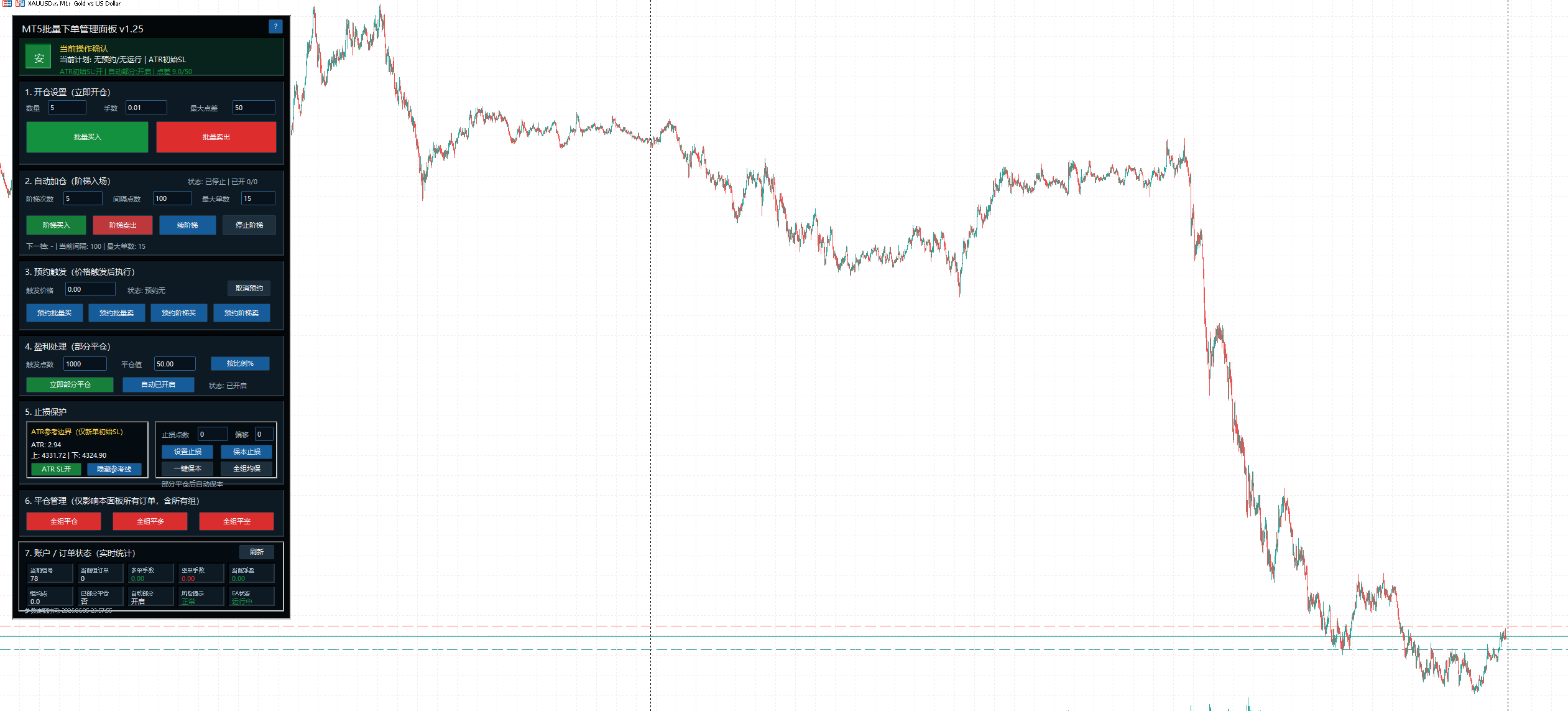
Batch buy/sell, ladder entries, pending triggers, partial closes, stop protection and order statistics.
About this tool
Public build v1.27 combines batch orders, ladder entries, partial closes and order statistics in one panel. Free for everyone, with no broker registration, account binding or authorization required.
Interface preview
Key features
- Batch buy / sell: order count, lot size and maximum spread
- Ladder buy/sell and pending triggers: spacing and maximum order count
- Partial closes by percentage or lots
- ATR reference boundaries, initial SL, break-even stops and group average-price break-even
- Close all, close buys, close sells, and account/order statistics
Before you use it
Compatibility:Desktop MT5 · Hedging accounts (netting accounts not supported)
Batch orders and ladder entries can increase position risk. The public build does not restrict accounts or servers, but it does not support netting accounts or mobile terminals and does not guarantee returns.
Files and installation
- MT5_BatchOrderPanel_Public_v1.27.ex5 (public build, no source code)
Open the data folder in desktop MT5, place the EX5 in MQL5/Experts, refresh Navigator and load it onto a chart. Algorithmic trading must be enabled to place orders. Check parameters and operations on a demo account first.
Installation guide